Stop struggling with complex timelines and expensive gear
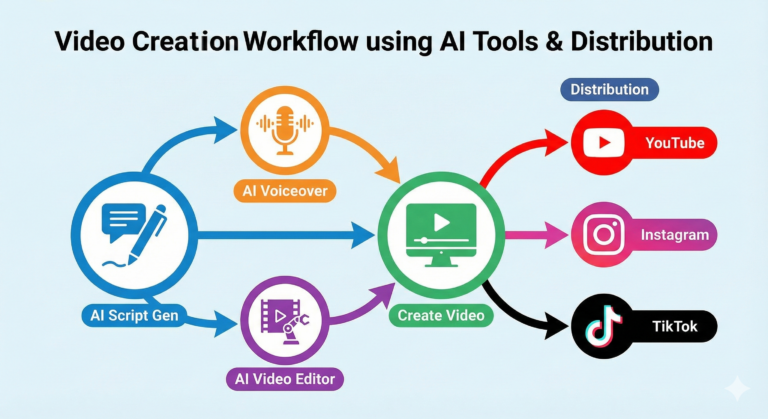
Here is a practical workflow to script, generate, edit, and distribute video content at scale using the most popular AI tools of the year.
Video is no longer optional; it’s the mandatory language of the internet. But traditional video production—cameras, lighting, actors, and endless hours in Premiere Pro—is a major bottleneck for businesses and creators trying to keep up with algorithm demands.
Enter the AI video workflow.
We aren’t just talking about shaky, uncanny-valley robots anymore. We are talking about studio-quality presenters, cinematic B-roll generated from thin air, and editors that assemble full videos from a simple text prompt.
Below is an end-to-end workflow leveraging three of the most popular and capable AI video tools currently available: HeyGen, Runway, and InVideo AI.
The Pre-Production Phase: The “Brain”
Before touching video tools, you need a plan. Don’t skip this step.
The Tool: ChatGPT (or Claude)
The Workflow:
Instead of staring at a blank page, treat your LLM (Large Language Model) as your head writer.
Prompt for structure: “Act as an expert video strategist. Give me 5 engaging video ideas for [Niche Audience] about [Topic].”
Draft the script: Once you pick an idea, ask for a script based on the platform. “Write a 60-second TikTok script for idea #3. Make it punchy, with a strong hook in the first 3 seconds, and clear call to action.”
Pro Tip: Always review and edit AI scripts. They often lack nuance. Add your own voice, slang, and specific brand examples to make it sound human.
The Production Phase: The “Muscle”
This is where the magic happens. We will use different AI tools for different types of video needs.
Tool 1: The Talking Head Specialist — HeyGen
If you need a spokesperson, an explainer video host, or personalized sales outreach, HeyGen is currently the market leader for realism. It excels at lip-syncing and natural facial movements.
The Workflow:
Take the script you generated in pre-production.
Choose an avatar from HeyGen’s library (or create your own—see recommendations below).
Input the text and select a voice (ElevenLabs integration within HeyGen provides the best results).
Generate the “A-Roll” (the main talking footage).
Recommendation: Use HeyGen’s “Instant Avatar” feature. Record 2 minutes of yourself talking to a webcam. HeyGen creates a digital twin that looks and sounds exactly like you. This is crucial for building authentic personal brands without having to film every single day.
Tool 2: The Cinematic B-Roll Generator — Runway (Gen-2/Gen-3)
A video of just a talking head gets boring fast. You need “B-roll”—supplementary footage that illustrates what the speaker is talking about. If you can’t afford stock footage subscriptions or film it yourself, Runway generates it.
The Workflow:
Review your script and highlight keywords (e.g., “futuristic city,” “person typing on laptop,” “mountain sunrise”).
Go to Runway. Use their Gen-2 or Gen-3 model.
Type in a descriptive prompt for the scene you need.
Download the 4-second clips to layer over your HeyGen narration later.
Pro Tip for Consistency: Instead of just using text-to-video, use Midjourney to create a high-quality image first. Then, use Runway’s Image-to-Video feature. This gives you much more control over the aesthetic and composition of the final video clip.
Tool 3: The All-in-One Assembler — InVideo AI
What if you don’t want to piece things together manually? If speed is your top priority for things like listicles, news summaries, or faceless YouTube channels, InVideo AI is the best “prompt-to-finished-product” tool.
The Workflow:
Give InVideo a prompt: “Create a 3-minute YouTube video about the top 5 benefits of remote work. Use an energetic male voiceover, energetic music, and stock footage.”
InVideo will write the script, generate the voiceover, find relevant stock footage from its library, add subtitles, and edit it all together in minutes.
Recommendation: Use InVideo’s “magic box” editor. Once the video is generated, you can edit it just by typing. For example, type “Replace the clip at 0:15 with something brighter,” and it will execute the edit for you.
Post-Production & Distribution: The Polish
You have your assets. Now you need to finalize them and get them seen.
The Assembly (If not using InVideo):
Drop your HeyGen talking head clip into a simple editor like CapCut (desktop or mobile). Drag your Runway B-roll clips over the parts where you want to illustrate a point. CapCut’s auto-captions are excellent for final polish.
The Distribution Workflow:
Don’t just post once. Repurpose.
The Master File: Create your main YouTube (horizontal) video.
The AI Remix: Use a tool like Opus Clip or Munch. Feed it the YouTube link. These AI tools will automatically find the most viral “hooks” in your long video, crop them vertically, add active captions, and give you 5-10 TikTok/Reels-ready shorts.
Automation Suggestions to Speed It Up
A workflow isn’t efficient if you are manually clicking every button every day.
Batch Scripting: Don’t write one script a day. Spend Monday morning writing 10 scripts using ChatGPT.
Batch Generation: Load all 10 scripts into HeyGen at once and go get coffee while it renders a week’s worth of content.
Social Scheduling: Do not post manually. Use tools like Metricool or Buffer. Upload all your AI-generated shorts at the start of the week and schedule them to post at peak times across TikTok, IG Reels, and YouTube Shorts automatically.
Summary of the “Big Three” Tools
| Tool | Best For | The “Killer Feature” |
| HeyGen | Realistic talking head videos, corporate training, personalized sales. | “Instant Avatar” (cloning yourself). |
| Runway | Creating custom B-roll, cinematic effects, abstract visuals. | Image-to-Video (for consistent style). |
| InVideo AI | Fast, “faceless” videos, listicles, turning blog posts into video. | The text-based AI video editor copilot. |
— Final Thoughts
AI tools are exponentially faster than traditional video production, but they are not autopilot. The creators who win in 2024 will be the ones who combine the speed of AI with human creativity, strategic scripting, and authentic storytelling. Use AI to handle the heavy lifting so you can focus on the message.