How designers & digital creators use AI tools, automation, and smart workflows to increase speed, constency, and revenue in 2026
Artificial intelligence is transforming the way designers, video creators, and digital entrepreneurs build, market, and scale their businesses in 2026. What once started as experimental tools for image generation and content ideas has evolved into full production workflows that automate design, video editing, branding, marketing, and digital product creation. Today’s top creative professionals are no longer asking if they should use AI, they are asking how to integrate AI tools into daily workflows to increase speed, improve consistency, reduce production costs, and deliver higher quality results for clients and audiences. In this article, we explore what’s actually working right now, including the best AI tools for designers and creators, practical automation strategies, real workflow examples, and actionable prompts you can start using immediately to stay competitive in the fast evolving creative economy.
🎥 1. Google Veo 3.1 Improves AI Video Generation and Vertical Output
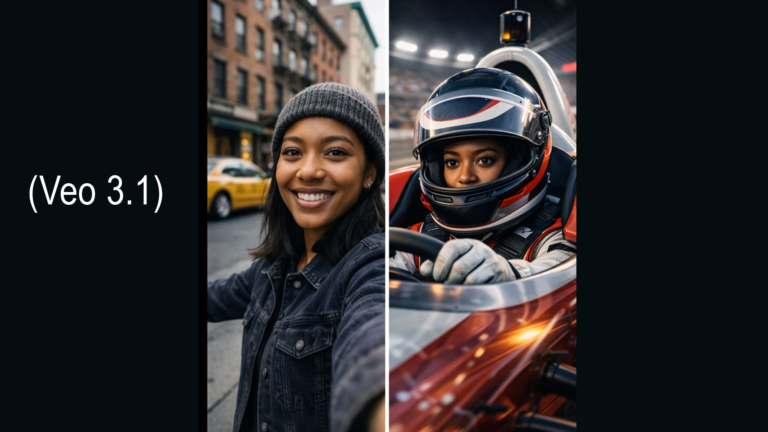
Google’s latest video model, Veo 3.1, delivers stronger motion consistency, better character stability across scenes, improved prompt accuracy, and native vertical video output. This means creators can generate mobile ready videos without manual resizing or cropping and maintain visual continuity when using reference images.
Veo also supports synchronized audio generation, allowing visuals and sound to align more naturally for short form storytelling.
Why This Matters for Creators
Vertical video dominates platforms like Instagram Reels, TikTok, and YouTube Shorts. Native vertical generation reduces editing time, preserves composition quality, and accelerates publishing speed. Designers can now move from concept image to finished motion asset in minutes instead of hours.
Best Practices
, Use one strong reference image instead of many to keep visual consistency
, Describe camera movement clearly such as slow push in, gentle pan, or stabilized tracking
, Add pacing cues like calm, energetic, cinematic to guide motion rhythm
, Keep prompts concise and focused on the primary visual story
Sample Prompt for Veo 3.1
Create a vertical 9 by 16 video from this image with smooth camera movement, natural lighting transitions, subtle ambient audio, and realistic motion designed for social media engagement. Maintain consistent character appearance and clean composition throughout the clip.
Workflow Example
1, Select your hero brand image or product visual
2, Upload it into Veo 3.1 or Gemini
3, Apply the prompt above and generate an 8 to 10 second clip
4, Review motion flow and lighting consistency
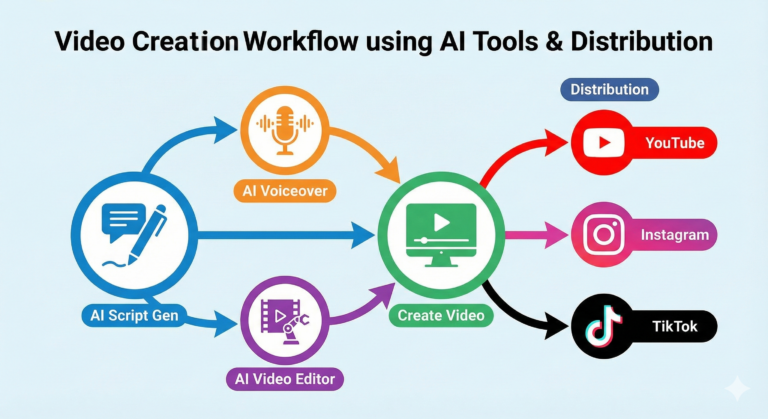
5, Export and post directly to Reels, Shorts, or TikTok
📹 2. Google Flow Expands AI Video Creation Inside Workspace
Google Flow is now available to more Workspace users and allows teams to generate video directly from text or images inside a familiar productivity environment. Flow enables lighting adjustments, camera angle refinement, object editing, audio generation, and scene sequencing without leaving Workspace apps.
Flow also integrates Nano Banana Pro for high quality image generation that feeds directly into video creation.
Why This Matters for Creators
Flow eliminates the friction of jumping between multiple creative tools. Teams can ideate, generate, revise, and publish video content faster while collaborating inside shared documents and workflows.
Best Practices
, Start with a short clear creative brief instead of long prompts
, Use reference images for faster alignment with brand style
, Generate short clips first, then extend once motion quality is approved
, Lock visual style early to avoid unnecessary rework
Sample Prompt for Flow
Generate a short promo video using this image with clean modern lighting, smooth camera movement, minimal background clutter, and soft ambient sound. Keep the focus on the main subject and ensure brand friendly composition suitable for social platforms.
Workflow Example
1, Open Flow inside Workspace
2, Upload your brand image or mockup
3, Generate a short preview clip using the prompt
4, Adjust lighting and camera direction
5, Extend duration and export final version
✂️ 3. Adobe Premiere and After Effects Add AI Powered Editing Tools
Adobe released new AI features in Premiere Pro and After Effects focused on faster subject masking, motion tracking, compositing, and motion graphics automation. These updates allow creators to isolate subjects, enhance motion typography, and build layered effects more efficiently with less manual frame by frame editing.
Why This Matters for Creators
Complex editing tasks that once required deep technical skills and time investment are now more accessible and faster. This improves production speed while maintaining professional quality for branded content, campaigns, and storytelling.
Best Practices
, Use AI masking first before manual cleanup
, Build reusable motion templates once, then scale them across projects
, Keep layers organized to maximize AI tracking accuracy
, Preview animation pacing before exporting final renders
Sample Prompt for Adobe AI Tools
Automatically isolate the main subject, enhance lighting clarity, smooth edge transitions, and prepare the clip for motion graphic overlays while preserving natural movement and color accuracy.
Workflow Example
1, Import your raw footage into Premiere or After Effects
2, Apply AI subject masking and tracking
3, Add motion graphics or overlays
4, Fine tune transitions and color
5, Export optimized formats for web or social

—Final Thoughts
The big takeaway is clear, AI is a serious production tool for real businesses and creators.
Tools like Veo 3.1, Flow, and Adobe’s AI upgrades are helping creatives move faster, reduce technical barriers, and scale content production without sacrificing quality. The creators who thrive in 2026 will be those who integrate AI into repeatable workflows, not just as a novelty tool, but as a strategic creative partner.
If you can consistently turn ideas into polished content in hours instead of days, you gain a massive competitive advantage.